A few weeks on from the suspected ransomware cyber attack on Optionis Group – Parasol’s parent company, contractors have found their personal data for sale on the dark web.
The discovery is the latest in a series of misfortunes to affect contractors employed through Parasol following the cyber attack in the second week of January.
As an umbrella company, Parasol employs temporary workers, often on behalf of employment agencies. Umbrella companies provide convenience for contractors and agency workers, and the companies who use the services of those workers, by managing contracts, timesheets and payroll, etc.
The role of an umbrella company also means it’s necessary for them to hold a large amount of personal and sensitive data. The introduction of the IR35 regulation in the UK, which relates to contractor / client relationships, has led to an increased use of umbrella companies by contractors and, consequently, an increased number of financial (payroll) transactions being made through those companies. As a result, companies such as Parasol now process and store a vast amount of sensitive financial data, making them attractive targets for cyber criminals.
The Optionis Group incident is the second major attack (that we know of) on an umbrella company in less than four months. Giant Group was the victim of a “sophisticated cyber attack” at the end of September 2021, which took the company’s communications and server network out of operation, and left some contractors without pay.
Timeline of the Optionis Group cyber attack and consequences
14th January 2022
Parasol initially advised its contractors that there was no access to the company’s operational and communication portals used to submit timesheets, view payslips, process contract extensions and so on.
Rumours began to circulate on social media that Parasol was experiencing a cyber attack, which was later confirmed by Optionis Group.
15th January 2022
Some of Parasol’s contractors started to report missing payroll payments or payments that were significantly lower than expected. When this was questioned, the company confirmed that payments were having to be made manually, implying that their bank accounts had been compromised.
21st January 2022
Parasol’s portals were restored. However, other companies within the Optionis Group had to move to rebuilt platforms. For example, an accountancy firm within the group reopened their portal with data migrated from their last back up – from November 2021, meaning 2 months’ worth of data was missing and needed to be manually re-entered.
4th February 2022
Social media reports confirmed that personal data from Optionis Group had been found on the dark web.
7th February 2022
An email from Optionis Group confirmed that their data had been found on the dark web and individuals would be advised if they had been directly impacted.
28th February 2022
At the time of writing, the contractor we spoke to had heard nothing further from Parasol / Optionis Group, despite finding their own personal data on the dark web.
Taking action
As someone who works in the cyber security and fraud industry, they have quickly taken matters into their own hands and put in place controls to mitigate the personal impact of this data breach.
They’ve paid to set up monitoring alerts with Experian and CIFAS to try to protect themselves from identity fraud. The platforms will alert them if their personal details are used to apply for financial products.
As the director of a limited company, they’ve also had to register with the Companies House protection scheme to protect their company and receive alerts if anyone tries to change, or conduct business using, their details.
There’s still no guarantee that the individual’s leaked details won’t be sold or used maliciously in the future.
And the issues at Optionis Group are ongoing, with some systems still not restored in full since the cyber attack.
The contractor we spoke to is, unsurprisingly, frustrated and angry about the situation:
“I know how devastating an information security breach can be, so when I heard that my accountants and umbrella company that I work through for payroll had been breached, I was immediately very concerned. When it was confirmed that the personal data had been located on the dark web, I was extremely angry as you just assume that your accountants have the necessary protection in place for your data and information. Obviously not. It’s vital that other such firms review their systems and ensure they have the utmost protection as these attacks are becoming more and more commonplace.”
This viewpoint is clearly held by other affected parties. ComputerWeekly.com reported that some contractors had “tak[en] it upon themselves to investigate whether their personal data [was] compromised…after growing frustrated at the time…[taken by Parasol] to provide updates on the situation.”
The same article reports that “a group action is being prepared…to seek compensation for contractors caught up in the breach”.
Clearly, the main fault here lies with malicious actors who carried out a targeted cyber attack in order to breach a company’s systems and steal personal data. However, every company that holds personal data has a legal duty to keep data secure and to respond to potential data breaches in a specific way. In this case, there appear to be failings on both the security and the response side by Optionis Group.
Cyber security support from ESA Risk
At ESA Risk, we offer a broad range of cyber security services that can help you secure systems and data, become more cyber-aware, identify breaches, and prepare for and respond to attacks.
Our consultants have proven experience of working in some of the UK’s top financial institutions where they have implemented secure cyber controls and continue to provide remediation and preventative cyber security and data breach support.
For advice and support on making your business cyber-secure, or if you’ve been the victim of a cyber attack or data breach / leak, please contact us at advice@esarisk.com, on +44 (0)343 515 8686 or via our contact form.

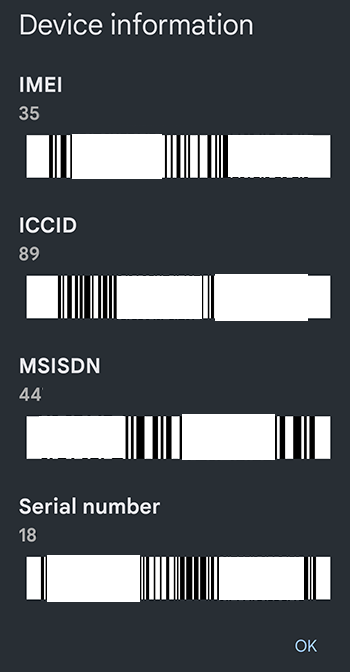 Make a record of your phone’s IMEI number, as well as the make and model number. The IMEI is a unique 15-digit serial number which you will need to give to your mobile operator to have your phone blocked. You can check your IMEI number by ‘dialling’ *#06# in your calls app (device information is displayed on-screen, rather than making an actual call). These details are also noted on a phone’s original packaging.
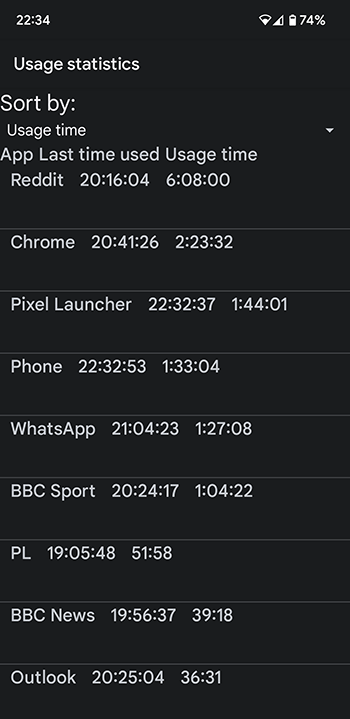 Additionally, there are some lesser-known tricks to check whether your smartphone is being tracked or if your security has been breached:
 The
The